In addition to a student's Family Portal account (see more here), JumpRope now supports additional linked Family Accounts. An individual Family Account is intended for a parent or guardian to be able to manage their own login credentials and access one or more students' JumpRope Portal. Family Accounts are optional.
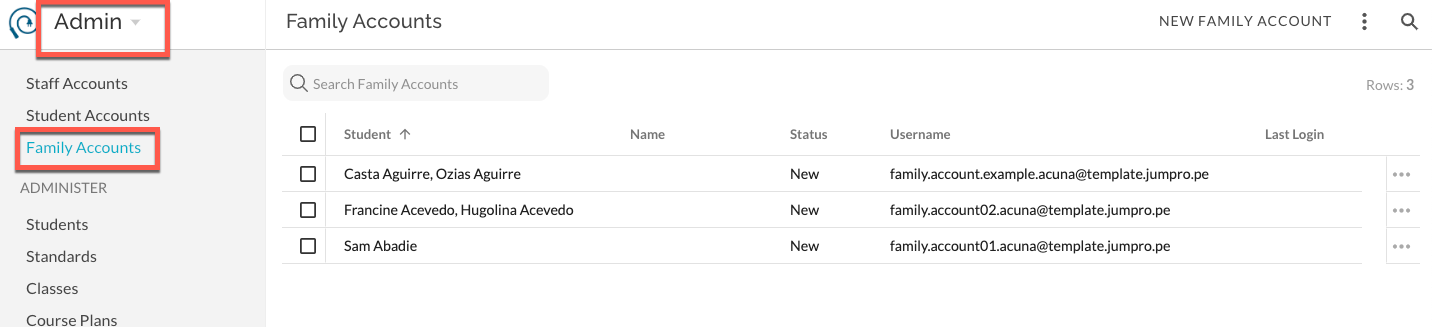
Create Family Accounts
- A Family members' account is initiated by the school through an email invitation (Create Family Accounts ).
- When creating and managing Family Accounts, the school identifies the associated student(s). The user cannot select their own student(s).
- A single Family Account username can be associated with up to 10 individual students at the school. For example, a parent can use a single email address username and access the JumpRope Portal for both of their children at the school in a single login session.
- In Admin - Family Accounts, each username is displayed. This includes, the status of the username/email (New, Invited, Active), student names associated with said username, the username itself. Optionally, the user can enter their own First and/or Last Name upon account creation.
- NYC Schools can use the RCON file from their SIS to import contact information from or email addresses.
Managing Family Accounts
- When a school sends an invitation to an email address, the recipient receives a link to login and create their account. From this account they have the option to change the email address they will use as their username and to enter a first and last name .Any changes they make will not change Student Profile information in JumpRope but will change the username/email information in the Family Accounts list.
- The invited user manages their own username and password. They do not manage the student portals that they have access to.
- For an Active account, Admin can add/remove students, re-invite, and delete the account. Admin cannot edit email, first, or last name.
How To
- How To - Create Family Accounts
- How To - Manage Family Accounts
- How To - Send Email Invitations for Family Accounts
Was this article helpful?
That’s Great!
Thank you for your feedback
Sorry! We couldn't be helpful
Thank you for your feedback
Feedback sent
We appreciate your effort and will try to fix the article